

FREQUENTLY ASKED QUESTIONS
Payments & Payment Arrangements
How do I make an EFT payment to Vodacom?
Can I pay my Vodacom account with cash?
What is a Promise to Pay (PTP) or Payment Arrangement?
How do I set up a “Promise to Pay” or Payment Arrangement?
What should I do if my payment hasn’t reflected after 48 hours?
Why did my debit order bounce or double-debit?
When will my manual EFT reflect?
How do penalty fees work after a returned debit?
Can I get a refund for overpayment?
Why is there a penalty after a returned debit?
How do I arrange a payment plan?
How do I make payment via the pay@ link using my Capitec account?
How do I make an EFT payment to Vodacom?
Add Vodacom (Pty) Ltd as a public beneficiary on your banking app. Use your 9-digit Vodacom Account Number (top right of your statement) as the payment reference. EFT payments may take up to 48 hours to reflect.
Can I pay my Vodacom account with cash?
Yes. Cash payments can be made at:
- Any Vodacom Walk-in Customer Care outlet
- Standard Bank, ABSA, FNB, or Nedbank branches
- Selected retailers such as Pick n Pay, Checkers, and PEP using your Pay@ reference number
What is a Promise to Pay (PTP) or Payment Arrangement?
A Promise to Pay is a formal agreement in which a customer commits to settling an outstanding balance, either in full or in part, on a specified future date.
How do I set up a “Promise to Pay” or Payment Arrangement?
If your account is overdue, you can arrange payment to avoid suspension via:
- TOBi: Say “Payment Arrangement”
- USSD: Dial *135# → My Account → Arrears Self Help
- Phone: Call 082 135
What should I do if my payment hasn’t reflected after 48 hours?
Email your Proof of Payment (POP) to [email protected]. Include your Vodacom account number in the subject line for faster assistance.
How do I get an “Account Paid in Full” letter?
After settling your final balance, request a paid-up letter by calling 082 135 or visiting a Vodacom store. The letter is usually issued within 24–48 hours after payment reflects.
Which payment methods can I use for my fibre account?
Payments can be made via debit order, VodaPay, Vodacom stores, online banking, ATMs, or retail partners such as Shoprite and Checkers.
Why did my debit order bounce or double-debit?
A debit order can bounce if there aren’t enough funds, if the bank has processing issues, or if the payment is submitted after the banking cut-off time. Any late resubmissions will only be processed on the next working day. A debit order may also be rejected during contract migration (from prepaid to contract) if the migration is still being processed.
When will my manual EFT reflect?
Manual EFT payments usually reflect within 24–48 hours, depending on your bank’s processing times. Payments made after hours, on weekends, or on public holidays may only reflect on the next business day.
How do penalty fees work after a returned debit?
If a debit order is returned unpaid, a penalty fee is charged to your account. This fee is applied each time a debit order is unsuccessful due to reasons such as insufficient funds or a bank decline.
Can I get a refund for overpayment?
Yes. If you have overpaid, you may request a refund. Once the overpayment is verified on your account, the refund will be processed according to Vodacom’s standard refund procedure.
Why is there a penalty after a returned debit?
A fee is charged each time a debit order is returned unpaid (e.g., insufficient funds or bank decline).
How do I arrange a payment plan?
Contact Vodacom Collections or Customer Care to request a payment arrangement. A consultant will assess your account and assist with setting up a suitable Promise-to-Pay date if eligible.
Customer Care: 082 135
How do I make payment via the pay@ link using my Capitec account?
Step 1:
Access the pay@ link received via SMS from Vodacom: https://payat.io/qr/11084
Step 2:
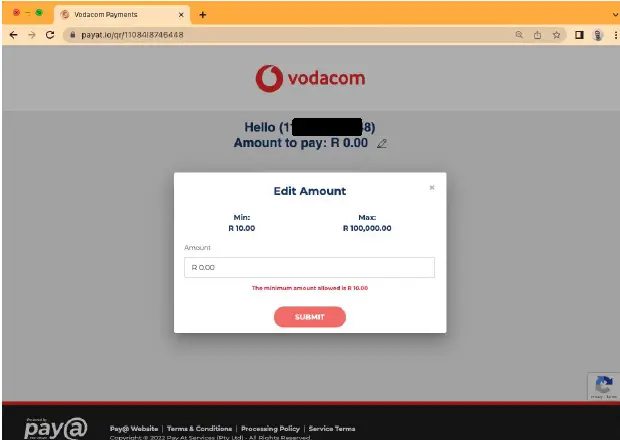
You will then be directed to the below page to enter in the amount you’d like to pay. Once you’ve entered in the amount, click on submit.
Step 3:
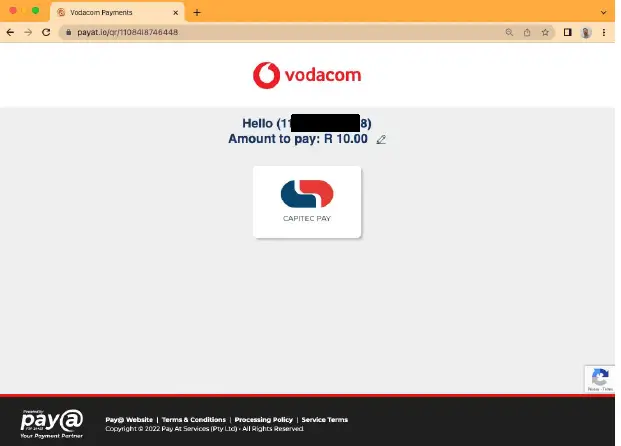
The payment page will then display the amount to be paid and you will then be required to select the Capitec Pay icon.
Step 4:
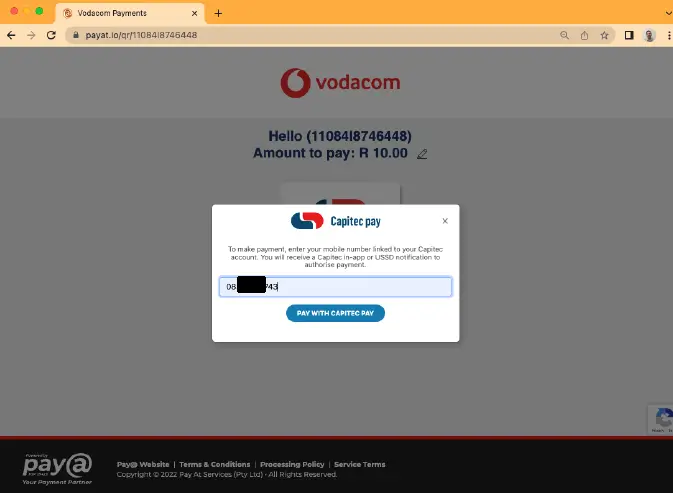
Next, enter in your cellular number that is registered to your Capitec bank account and click on “Pay with Capitec Pay”:
Step 5:
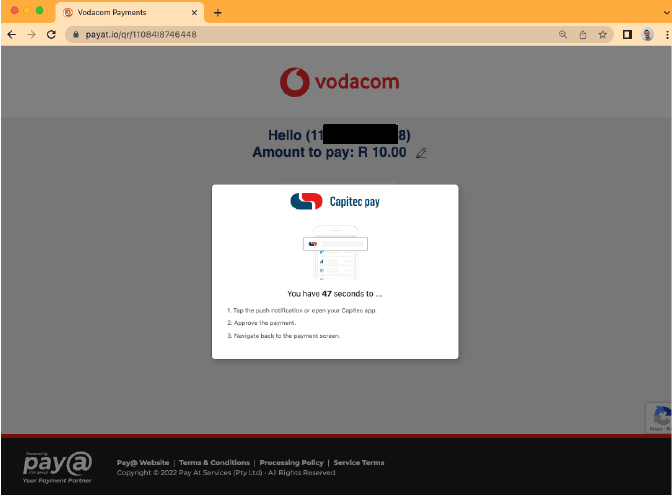
You will then be guided to look for a payment notification from the Capitec App on your phone and will have up to 1 minute and 30 seconds to complete the transaction.
Step 6:
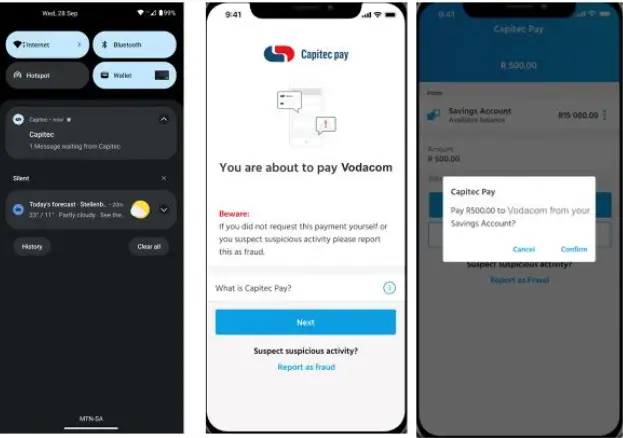
Next you will receive a push notification on your phone, click on the notification and the Capitec App will open indicating that you are about to make a payment to Vodacom.
You will then be required to confirm the payment using you Face ID, Fingerprint or App pin.
Step 7:
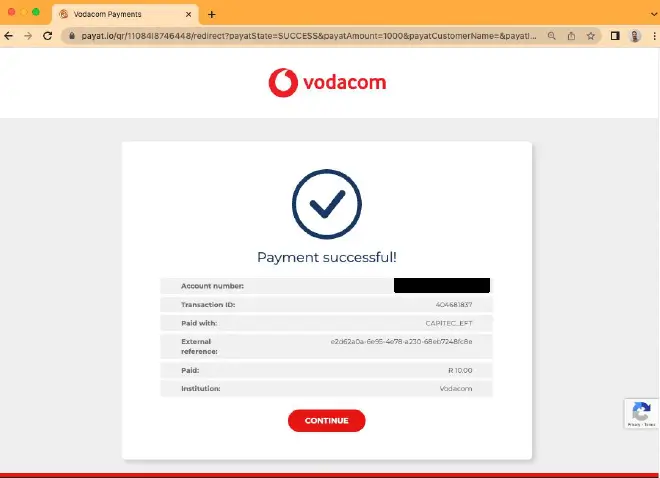
Once you have confirmed the payment, you will be notified on the payment page that the transaction has been successful.
A failed transaction could occur due to the following reasons:
- Customer chose “cancel” in the Capitec App
- The push notification is not received on the phone; this can be due to connectivity issues or an incorrect cell number being entered.
- Customer ignores the push notification.