FREQUENTLY ASKED QUESTIONS
Fraud, Scams & Hoaxes
Social Engineering
Social Engineering – The ultimate exploitation
Social engineering is a term that encompasses a broad spectrum of malicious activity which rely heavily on elements of human psychology, such as trust, curiosity, incentive, fear, etc. to manipulate and deceive unsuspecting victims. A social engineer specifically uses social interactions with intended victims to either get something from you such as your personal information, banking details or passwords or get you to do something such as electronically transfer funds or allow access to systems or premises.
Types of Social Engineering Attacks
Social engineering attacks can occur in a number of ways:
- face-to-face interactions
- telephonically (also referred to as voice phishing)
- SMS text messages (also referred to as smishing)
- email phishing tactics or
- any combination of the above
The most commonly encountered are email phishing attacks which encompasses carefully crafted messages that gives the impression of coming from a trusted source. Phishing is also one of the most prevalent ways attackers are breaching security measures and obtaining unauthorized access to data because it’s easy and it works. Attackers don’t have to worry about hacking firewalls, decryption of data etc. and quite simply just have to come up with a fraudulent email message that would trick some unsuspecting victim to embark on a course of action.
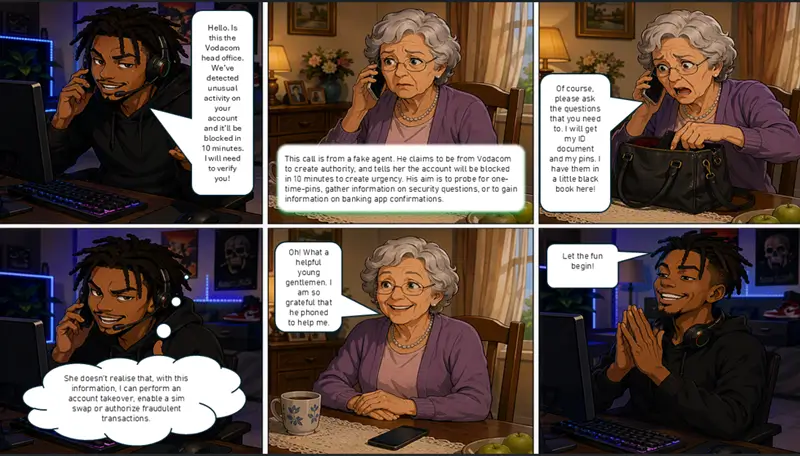
Vishing (voice phishing) is essentially the same as phishing, but perpetrated over the phone or telephonically. Through vishing a social engineer will call the intended victim – often under some or other pretence such as being from technical or customer support – to trick the victim into divulging information, login credentials or even banking details. This type of attack is also often used to target organizations by tricking employees to disclose company related information such as financial or employee information, and even password resets.
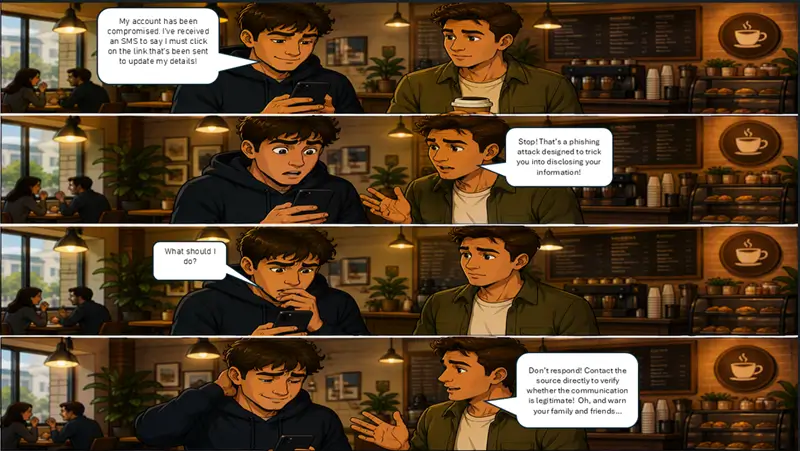
SMS phishing - also similar and called smishing— is the fraudulent practice of sending fraudulent text (SMS) messages to lure or induce victims into divulging personal or other sensitive information, such as passwords or account details.
Don’t become a victim of social engineering
Understanding social engineering tactics will assist to readily identify this threat when encountered. Moreover, inculcating and practising certain basic behaviours, will further assist to safeguard oneself:
- Don’t let your emotions get the better of you.
- If a query or request seems strange or if you feel pressured into making a decision or taking action, stop and think!
- Follow your instincts and when in doubt, don’t respond, don’t click, and don’t make assumptions.
- Treat any request for confidential, sensitive or financial information with a high degree of scepticism.
- If you suspect that someone is fishing for information to which they should not be privy to, stick to your guns and don’t provide the information.
- Never respond to emails that appears to be from your financial institution/bank requesting you to confirm or update personal details.
- Never disclose or share your login credentials, online IDs, passwords or PINs with anyone or allow someone to log in to your accounts on your behalf.
- Remember that fraudsters/social engineers are able to spoof caller line identification (CID) numbers. Do not place absolute reliance on CID for purposes of authenticating a caller.
- Keep your system software up-to-date and use the latest security patches available.
- Ensure that the latest anti-virus software is installed on your computer.
Credit card fraud prevention tips
- Always keep an eye on your credit card and ensure that it's returned to you as quickly as possible. Do not let your credit card out of your sight.
- Be very careful who you hand your credit card to. Never give out your account number telephonically unless you are certain that the company is reputable. Don't ever offer your credit card information over the phone if you are not the initiator of the call. An example of this would be where you are told that there has been a 'computer problem' and the caller requests that you verify your information. Legitimate companies will never demand that a credit card number be verified over the phone.
- Never respond to requests that you provide your personal or credit card information via email or by clicking a link in an email. These are called 'phishing' scams and are intended to deceive individuals into disclosing private/personal information.
- Never enter your credit card information on a non-secured website.
- Upon receipt of a credit card, sign the reverse immediately.
- Shred all credit card applications obtained.
- Do not write your PIN number on, or anywhere close to, your credit card because if your wallet gets stolen, this information will be available to the fraudster.
- Never leave your credit cards or receipts where these are accessible to others.
- Shield your credit card number from those around you to ensure that it is not copied or captured via cellphone or camera.
- Compile and store a list in a secure location including all your account numbers, card expiration dates and the contact details and address of each bank that has issued you with a credit card. Keep this list updated when you receive a new credit card.
- Keep only those credit cards which you absolutely need on you. Do not carry rarely used additional cards.
- Open credit card bills promptly and ensure that no incorrect or fraudulent charges have been allocated to your account. Reconcile your credit card statement as you would a checking account statement. This should be done on a monthly basis by saving your receipts for reconciliation against your monthly bills.
- If you find any charge for which you do not have a receipt or that you do not recognise, report this promptly and in writing, to the credit card issuer.
- Always void and destroy incorrect receipts.
- Shred any documentation visibly displaying your credit card number.
- Never sign a blank credit card receipt. Carefully draw a line through the open sections where additional charges could be fraudulently inserted.
- Carbon paper is rarely used these days, but should this be used in a credit card transaction, destroy it immediately.
- Never insert your credit card account number where it is visible, such as on a postcard or where it can be seen through the envelope payment window.
- Ideally, it is advisable that you do not carry your credit cards in your wallet. It could, perhaps, be kept in a zipped compartment or a small pouch.
- Never lend your credit card to anyone else.
- Should you move, always notify your credit card issuer in advance of your change of address.
A checklist to outsmart fraudsters
- Do not offer credit card or login details either telephonically or via email.
- Never divulge your PIN or the 3-digit security code at the back of your card - not even if you are told that the caller/sender represents your bank or the police. Your bank will never request this information.
- Criminals aim to either steal your card of 'skim' it. Keep an eye on your card the second it leaves your hands - even if that payment is made at your table at a restaurant.
- Do not be distracted by chatter. Always watch your card. If you are uncomfortable with a transaction, report this to the manager or your bank, or check your transaction history online as soon as possible.
- Do not store your information under the caption 'PIN' or 'bank PIN' on your cellphone. In fact, do not store this information at all on your cellphone because if it's stolen along with your credit card, this will only make it easier for fraudsters. The only safe method is to memorise this information and to keep it exclusively to yourself.
- Shred any unfiled bank statements. Potential fraudsters have been known to search rubbish bins for this information.
- Only shop on secure websites. Prior to entering card details, ensure that the padlock or unbroken key symbol is visible in your browser.
- Ensure that you have up-to-date anti-virus software on your computer and scan this at least twice a week. Use the anti-virus software recommended by your bank.
- Apply for SMS alerts to be sent to you every time your card is used. SMS instant notifications can be set up on request by your bank.
- Ensure that the PIN for your credit card account is unique. Do not duplicate passwords used for other accounts.
- Do not select a PIN which is easy to deduce such as a birthdate, home address, child's name or anniversary.
- If you are travelling abroad, always keep an eye on your card. Travellers often become complacent while travelling and, as a result, may become the victims of crime or fraud.
- Shop at stores displaying the SureSwipe anti-fraud logo. For your protection, staff members at these locations have been expertly trained on fraud detection and management.
Fraudulent SIM swaps
What are fraudulent SIM swaps?
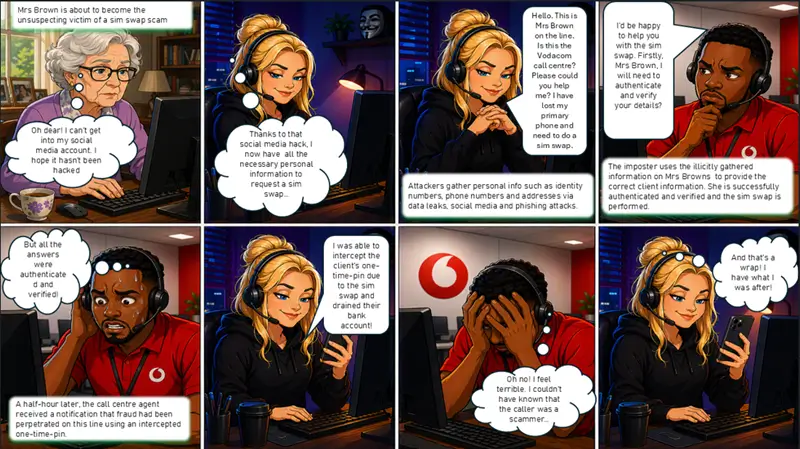
Fraudulent sim swap is a mobile-specific fraud type in terms of which the fraudster approaches the service provider (SP) purporting to be a customer and requesting that their existing mobile (cellular) number be assigned to a new or ’replacement’ sim card. The request is often done under the pretence that the sim card has been lost or stolen.
Once the sim swap request has been processed, the fraudster is able to access the new sim card and may divert calls and receive the customer’s sms notifications – including ‘InContact’ or ‘Notify Me’ messages, verification numbers and one time pins (OTPs) – as these will be sent from the bank to the new sim card.
The objective of these fraudulent sim swaps is mainly to intercept OTPs sent by sms for banking transactions over the Internet. In less serious instances, this practice is used to steal airtime balances or loyalty points from authentic customers.
The steps involved in unlawfully accessing your online banking accounts usually entail the following:
- In order to be successful, generally the fraudster would need your bank account details – including your Internet banking password and other personal identifying information obtained through phishing or smishing (the use of a fraudulent email or sms message in order to access this type of confidential information).
- The fraudster will not only require your bank details but will also need your cellphone number in order to carry out a fraudulent sim swap in your name. This may be obtained from various sources, including – but not limited to – consumer databases.
- The sim swap is specifically done to intercept sms notifications (including OTPs) that are sent to your cellphone number when you log on to your Internet banking, set up or make payments to a beneficiary or beneficiaries or when you make changes to your account limits.
- Remember, once your number has been sim swapped, you will no longer receive sms notifications from your bank regarding transactions performed on your accounts.
To safeguard against sim swap fraud, here are a few tips:
- Always be conscious of your cellphone’s connectivity status. If you suddenly cannot make or receive calls or messages (sms), do not automatically assume that you have a problem with your network or handset. Contact your service provider or network operator immediately and enquire whether a sim swap has been processed on your number.
- Never ignore a sms message alerting you to a pending sim swap request on your account. Contact your service provider immediately to confirm that all is in order.
- Should you receive a call or sms from a source purporting to be your service provider requesting that you ignore a sim swap sms notification, contact your service provider urgently to report this.
- Never disclose any sensitive or personal information such as login details, bank details or passwords telephonically to any source, including persons identifying themselves as bank officials or claiming to represent your service provider.
- Instruct your service provider to deactivate you sim card where an unauthorised or fraudulent sim swap has taken place on your cellular number.
Bank safely tips:
- As far as possible, avoid Internet banking on public terminals (computers) that could be accessed by outside parties.
- Banking via a Wi-Fi hotspot is not recommended. A fraudster could quite easily set up a fraudulent Wi-Fi network to collect information from unsuspecting users.
- Use the latest browser and anti-virus software applications on your computer.
- Ensure that the Internet banking webpage that you are transacting on is on a secure site. This can be verified by confirming that a padlock appears in the lower right of your browser window and by ensuring that the address starts with https.
- After completing your online banking transactions, ensure that you log off or sign out and close the browser window.
When you receive an email claiming to be from your bank, remember:
- Do not open emails from unknown sources – even if these appear legitimate or authentic and seem to come from your banking institution.
- Under no circumstances should you reply to these emails or enter into any form of communication with the sender.
Never confirm or update your bank account details via email. - Never follow a link provided to you in an email to access the Internet banking site for your banking institution. Rather physically type the address into the browser address bar.
- Never disclose any of your personal details, including cellphone account information, to anyone.
Keep your device safe:
- Password-protect your handset or tablet. As far as possible, set the screen auto-lock timer to activate after just a few minutes of inactivity.
- Use strong passwords that would not be easy to guess. Do not duplicate or reuse these passwords across your devices and change these regularly.
- Disable automatic connections. Some devices automatically allow connections to available Wi-Fi networks and Bluetooth devices and may connect and transmit data without your knowledge.
- Consider using your manufacturer’s freely available applications which allow you to find and track your device if lost. These applications also give you the option of locking or wiping your phone remotely if required.
- Refrain from saving bank account details, passwords or pins as contacts on your device.
Suspicion of credit card fraud
If your credit card is lost or stolen, contact and inform the issuing bank immediately.
Most credit card companies have toll-free numbers and a 24-hour emergency service as they are also eager to avoid credit card fraud.
Top 5 list of current scams
While we are constantly baited by scammers using SMS, email, social media or telephonically, the scams you are likely to encounter are not new have been done time and time again. Scammers have however become more sophisticated than before and nowadays also take advantage of new and emerging technologies such as AI which enable them to reach a larger number of victims with more convincing communiqués.
Rewards scams
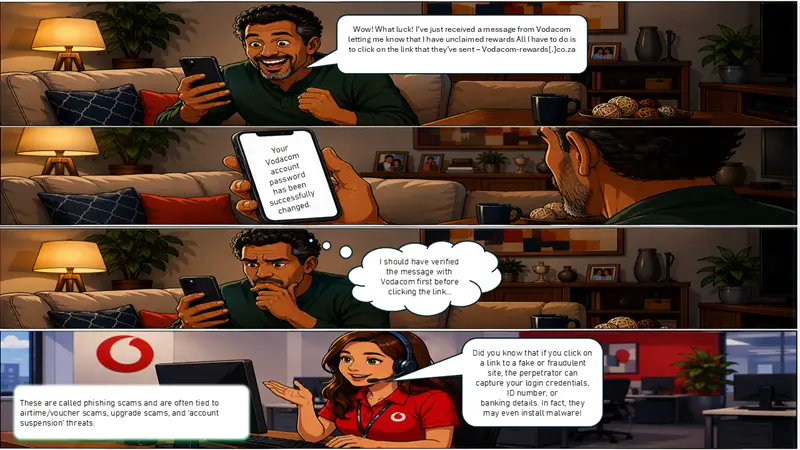
A scam that repeatedly circulates on various social media platforms and SMS (text messages) advises members of the public that their reward points or balance is about to expire and to redeem these by clicking on the link provided in the message. The messages are designed to trick victims into clicking on the link provided which redirects to a spoofed website (with similar design, appearance & address of Vodacom) in order steal personal and confidential information (for example ID numbers or bank account details) or process unauthorised online purchases.
Summer promotion scams
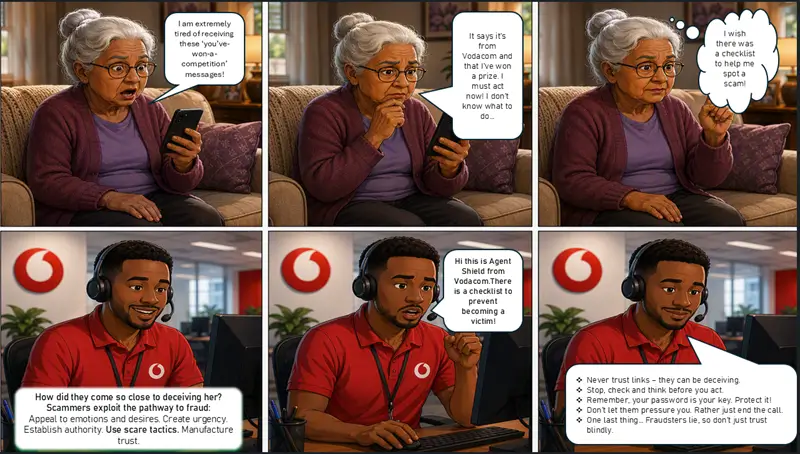
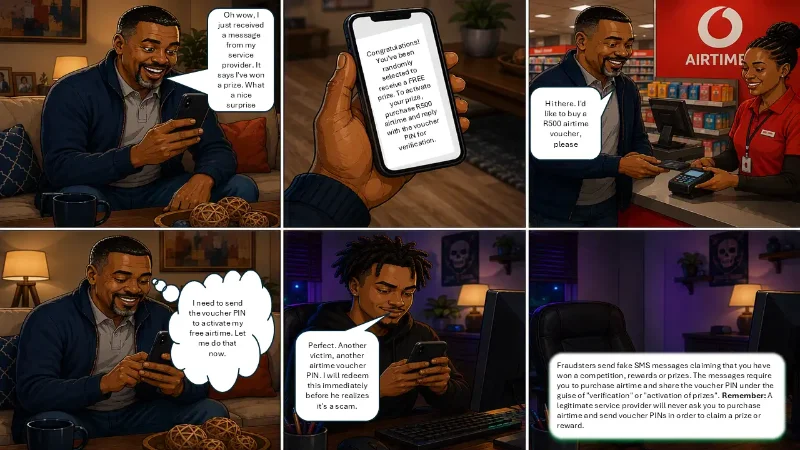
Members of the public may also be contacted via sms and via voice calls and informed that they have a high value prize such a vehicle, television, laptop or other devices as part of Vodacom’s Summer promotion, however in order to claim the prize or confirm their participation they are required to purchase Vodabucks, make a Donation or provide recharge vouchers of a specified amount.
Competition scams
Another variation encompasses messages advising that they have certain “rewards” comprising appliances or electronics (such as fridges, television sets etc) and in some instances also groceries. In terms of the scam victims may be required to first pay a delivery fee or insurance fees. A quotation setting out the costs may also be sent to the victim in order for payment to be made before delivery of the appliances, electronics or groceries can take place.
Advance fee fraud scams
Scammers also target victims with calls advising that they have won cars and cash prizes, in advanced fee fraud scam. In terms of the scam the scammers will persuade/convince you to make some form of payment whether it be financial or transferring of Vodabucks to themselves in order to qualify for your prize or allow for your prize to be released.
If you receive a scam / have been scammed
While it is very challenging to track down the fraudster or syndicate responsible for the scam, there are several steps you can take to stay safe from scams or reduce the potential for losses/damage if you have been scammed.
- Objectively check the facts - Remember, if claims being made seems too good to be true, it probably is.
- Trust your intuition and, if something feels wrong, call the implicated organization to validate the claims.
- Remain vigilant as scammers often try to target your emotions by telling you that you have won a prize or money in order to get you in a heightened emotional state and therefore more likely to get caught up in the scam.
- Exercise extreme caution with any communications requesting money, fees, or upfront payments for claiming a prize, reward or for whatever reason – these should immediately raise your suspicions.
- Be on the lookout for unnecessary urgencies conveyed in communications as scammers will try to establish a sense of urgency in order to cloud your judgement and pressure you into acting on their requests.
- If you doubt the legitimacy of any communication (received via SMS, email, social media, or telephonically) or that appears unusual or suspicious, contact the source directly and verify whether or not the communication was indeed true and sent by the source.
- Check suspicious communications for improper use of company logos, branding and graphics that appear unusual or odd, and phrases and word choices that appear unprofessional.
- Never give out your personal information, bank or credit card details to anyone you don’t know, is not a trusted source or where it appears out-of-the ordinary. Ignore and do not respond to unsolicited communications requiring you to disclose such information.
- Don’t click on any links provided in emails or messages that you did not expect or where unsure of the sender - hover over links to see if the web address is legitimate and relates to the email or message content.
- If you come across scams and hoaxes, report it to the implicated source/organisation/platform and warn your friends and family as well. By reporting and sharing your story, you are helping to fight back against the scammers.
- If you suspect that you have responded to a phishing scam, contact your service provider or bank to report the attempt and request that they monitor or block your account.
TikTok scam - Unlimited monthly data
According to surveys conducted, individuals are particularly prone to scams on social media platforms and everyone is a potential target for scammers, regardless of age. There are several TikTok scams which include work-from-home job scams, impersonation scams that mimic celebrities or brands, investment scams and fake giveaways or unrealistic offers. In the latest scam currently doing the rounds fraudsters are posting adverts on TikTok that invite unsuspecting members of the public to purchase unlimited monthly data on the various networks. Victims are requested to pay a small amount to access this service and provided with a bank account to transfer / make payment for the service.
To stay safe, exercise caution with "too good to be true" offers and avoid avoid clicking on suspicious links. If you encounter any suspicious posts or activities on social media that you believe may be fraudulent, report or verify such postings or any suspicious activity directly with the service provider. Scammers on TikTok can be reported via TikTok’s Report button and then choosing a reason like "Frauds and Scams". Remember to also warn family and friends of the scam.
Report a scam or hoax
To report any fraudulent communications being sent on our network email: [email protected]
Wise Up! – Toon Talk